Wednesday, 6 July 2011

Google Maps 5.7 for Android introduces Transit Navigation (Beta) and more

(Cross-posted on the Google Lat Long Blog and the Google Mobile Blog)

Today we’re releasing Google Maps 5.7 for Android. From Bangkok to Baltimore, we’ve added Transit Navigation (Beta), updated access to directions, better suggested search results and a photo viewer to Place pages—all of which can help you whether you’re traveling to an unfamiliar part of town or visiting a city across the world.

Transit Navigation (Beta)
Google Maps Navigation (Beta) currently provides over 12 billion miles of GPS-guided driving and walking directions per year. Now, GPS turn-by-turn (or in this case, stop-by-stop) navigation is available for public transit directions in 400+ cities around the globe with Transit Navigation.


Transit Navigation uses GPS to determine your current location along your route and alerts you when it’s time to get off or make a transfer. This is particularly helpful if you’re in a city where you don’t speak the language and can’t read the route maps or understand the announcements. After starting your trip with Transit Navigation, you can open another application or put your phone away entirely and Google Maps will still display an alert in your notification bar and vibrate your phone when your stop is coming up.
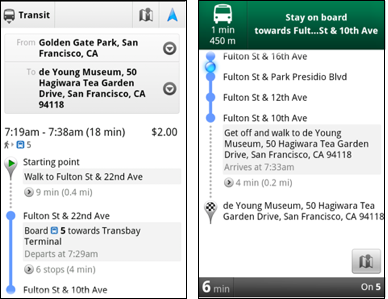

Left: Transit directions without Navigation. Right: with Navigation


Navigation alerts appear even if you switch to another app

Now you can spend more time enjoying the sights out the window and less time worrying about how many stops are left, where you are along the route or whether you missed your stop. Since Transit Navigation relies on GPS signals, we recommend using this feature for above-ground transit.

Updated Directions
Now that we’ve improved our directions services, we wanted them to be incredibly easy to pull up on your screen. If you select the driving or walking icon and your route is supported by Google Maps Navigation, the Navigation icon will automatically appear so you can get access to step-by-step directions in one click. Note: this change is currently only in place for driving and walking and does not appear for public transit.


One-click access to Navigation from directions

We’ve also streamlined how you access directions from within a Place page. Before, clicking directions in a Place page would bring up options for “Driving Navigation,” “Walking Navigation” and “Directions.” Now, you’ll be taken straight to the map and see the new directions box shown above.

Improved Search Suggest
We’ve made two changes to search suggestions that improve their quality and speed. First, we’ve added category icons, so instead of all search suggestions displaying the same icon, the icon next to the listing will reflect the type of result. You’ll see a pin for a Google Places listing, a star for a starred Place or location, a clock for a previously used search term, a person for contacts and a magnifying glass for “anything else.”


Two examples of search suggest with new icons

Also, any place you got directions to or called directly from its Places page will be included as a suggestion for a relevant search. For example, if you recently received directions to the U.S. Post Office on Wilshire Boulevard, afterward, when you begin a search with [p] or [bou], that U.S. Post Office would appear as a search suggestion.

Photo viewer for Place pages
Since we released business photos for Place pages last October, millions of photos have been added to Place pages around the world. To enable you to view these photos on the run, a slick new photo viewer has been added so you can browse photos while deciding where to go.


Left: Business photos in Place pages. Right: New photo viewer

To start using Google Maps 5.7 for Android, download the update here. This update requires an Android OS 2.1+ device and works anywhere Google Maps is currently available. Learn more at our help center and have fun exploring, whether it be by car, transit, bike or foot.

Thursday, 30 June 2011

GoogleServe 2011: Giving back around the world

Over the last month, more than 7,700 Googlers helped serve their communities across 400 different projects as part of GoogleServe, an employee-driven initiative organized almost entirely by volunteers. Through partnerships with nonprofits, schools and local governments, Googlers from 119 cities in 36 countries helped communities in need with projects ranging from educating youth about online bullying to cleaning up local rivers and parks.

GoogleServe began in 2008 and has become an annual company tradition. Giving back to our communities not only revitalizes and strengthens our connections with the cities and towns in which we live and work, it also brings us closer together as a global team. Each year the event has grown in size and scope and this year’s GoogleServe was our largest yet. Here’s a sampling of some of the projects we participated in this time around:
While GoogleServe is an annual celebration of community service, employees donate both time and money to organizations and causes throughout the year. You can find opportunities to serve your local community at All For Good.

Here are some photos of our team in action:


Tuesday, 28 June 2011

The +1 button goes global, comes to India

[Cross-posted from the Google Webmaster Blog]

A few months ago we released the +1 button on English search results on google.com. More recently, we’ve made the +1 button available to sites across the web.

The +1 button is a simple idea - with one click, Google users can recommend pages across the web to their friends, contacts and the world. As a publisher, that could mean more and better qualified traffic coming to you from Google as potential visitors see recommendations from their friends and contacts next to your Google search results.

Today, +1s will start appearing on Google search pages globally, including google.co.in

We’ve partnered with a few sites globally where you’ll see +1 buttons.
Some Indian sites that have already implemented +1 are:


Alok Kejriwal CEO and Co-Founder of Games2win.com India said, “Online games are highly 'searched for' by lots of consumers on search engines and we are delighted to have the +1 button implemented on our site. It immediately allows better content to bubble up and get noticed by friends on the Google network and hence provided a nice referral to click upon. Simply said & in our context, it adds a nice spin to socializing single player games!”

Archit Sharma, VP - Product & Marketing, Jasper India said, "Continuing with our endeavor to serve users with more & more relevant deals, we are happy to incorporate Google +1 buttons. We are confident that this feature will bring us closer to our users, generate valuable feedback and help us improve our services further."

To get started, visit the +1 button tool on Google Webmaster Central where the +1 button is already available in 44 languages.

To install the +1 button, you’ll configure a small snippet of code and add it to the pages where you want +1 buttons to appear. You can pick from a few different button sizes and styles, so choose the +1 button that best matches your site’s layout.


There are a few easy ways to ensure the +1s you receive map as often as possible to the pages appearing in Google search results. For advanced tips and tricks, check our Google Code site. Finally, if you have any questions about using the +1 button on your websites, feel free to drop by the Webmaster Help Forum.

Adding the +1 button could help your site to stand out by putting personal recommendations right at the moment of decision, on Google search. So if you have users who are fans of your content, encourage them to add their voice with +1!