Showing posts with label mobile. Show all posts

Wednesday, 19 October 2011

Mo-mentum: what’s new with mobile search advertising

Mobile search helps people find what they need in a snap. Whether they’re choosing between two restaurants, shopping for a new watch, or buying a movie ticket, people make better decisions when they have access to more information. Search ads are information—answers—and on mobile devices, they’re able to connect people and businesses in new, useful and relevant ways.

Today, we’re unveiling new mobile search ad formats and some new details about the ways many different businesses are benefiting from mobile advertising.

Search ads, meet mobile apps
We’re bringing the worlds of search and apps together with mobile advertising in a few ways:
  • Search ads in mobile apps: Lots of mobile apps give people the ability to search for information—like an app that lets you search for a restaurant nearby. Today we’re announcing Custom Search Ads for these apps. These ads provide useful and relevant answers, for people searching within a mobile app. Custom Search Ads will also help app developers earn more money to fund their apps and grow their businesses on mobile.

    Custom Search Ads in mobile apps

  • Click to Download: Not surprisingly, many people use Google to search for information about mobile apps. This ad format helps consumers right when they're searching for information about an app, linking them directly to the App Store or Android Marketplace to download. We’ve recently enabled app developers to include app icons and information about the app in their ad unit so that people can make more informed decisions about whether they want to download the app.
  • Mobile App Extensions: This new, beta ad unit enables businesses to use mobile search ads to direct someone to a page within a mobile app already installed on their phone. For example, if someone searches for sneakers on a mobile device, they might see an ad that takes them directly into a cool shopping app they’ve installed on their phone.


Local search ads—so hot right now
Building local context into mobile ads makes them more useful both for both consumers and businesses. Here are a few specific examples:
  • Click to Call: We introduced these ads for high-end smartphones less than two years ago and they're now driving millions of calls per week to hundreds of thousands of businesses around the world. Click to call ads have been very effective in generating leads for businesses of all sizes, across many verticals—more people can call an Enterprise Rent-A-Car near them for rentals and more potential customers can connect with ADT Security for alarm system expertise, for example.
  • Hyperlocal search ads: Launched a year ago, these search ads contain useful local information like phone numbers, driving directions, a number to click and call a business directly, and also show people how far they are from specific business locations. Roy’s Restaurants’ efforts with this format led to a 40 percent increase in call volume—and lots more full tables!
  • Proximity as a factor in mobile search ads ranking: The distance between a person and an advertiser’s business location is now a factor in mobile search ads ranking. This means an ad for a business with a physical location close to to a consumer may perform better in AdWords—driving more mobile traffic at a lower cost. The feature will be effective only when consumers opt in to share their device location for mobile searches. It will make our hyperlocal format more useful for businesses and users—advertisers can get started with this by creating Location Extensions for their mobile campaigns. Particularly this holiday season, when consumers are using their mobile phones to find a nearby store for last minute gift purchases, this new feature will help connect customers with storefronts.
  • Circulars: We began testing this new ad format with Best Buy and Macy’s earlier this month. When someone clicks on a search or display ad (on desktop, mobile or tablet devices), they may see these engaging ads which contain photos of relevant products and special offers. With a few simple clicks, people who are at their desk can email that circular to their mobile phones, and later walk into their local store, flash their phone and redeem the offers.

Macy’s Circular ads on mobile

The exciting thing for mobile users and businesses is that the possibilities for mobile search advertising are nearly endless. We’re looking forward to helping businesses and consumers alike take advantage of this brave new (mobile) world.

Thursday, 15 September 2011

New tools to help publishers maximize their revenue

What do a celebrity blog, a video interview on a newspaper site and a cable channel’s smartphone app have in common? They’re all supported by advertising...and they’re all examples of how the lines between media formats are blurring.

These increasingly blurry lines are not only resulting in highly engaging forms of content for users, but many new revenue opportunities for publishers. A wave of innovation and investment over the past several years has also created better performing ads, a larger pool of online advertisers, and new technologies to sell and manage ad space. Together, these trends are helping to spur increased investment in online advertising. We’ve seen this in our own Google Display Network: our publisher partners have seen spending across the Google Display Network from our largest 1,000 advertisers more than double in the last 12 months.

With all these new opportunities in mind, we’re introducing new tools for our publisher partners—in our ad serving technology (DoubleClick for Publishers) and in our ad exchange (DoubleClick Ad Exchange).

Video and mobile in DoubleClick for Publishers
Given the changes in the media landscape, it’s not surprising that we’ve seen incredible growth for both mobile and video ad formats over the past year: the number of video ads on the Google Display Network has increased 350 percent in the past 12 months, while AdMob, our mobile network, has grown by more than 200 percent.

Before now, it’s been difficult for publishers to manage all their video and mobile ad space from a single ad server—the platform publishers use to schedule, measure and run the ads they’ve sold on their sites. To solve this challenge, we’re rolling out new tools in our latest version of DoubleClick for Publishers that enable publishers to better manage video and mobile inventory. Publishers will be able to manage all of the ads they’re running—across all of their webpages, videos and mobile devices—from a single dashboard, and see which formats and channels are performing best for them.

A handful of publishers have already begun using the video feature and it appears to be performing well for them: we’ve seen 55 percent month-over-month growth in video ad volume in the last quarter. In other words, publishers are now able not only to produce more video content, but to make more money from it as well.

Direct Deals on the DoubleClick Ad Exchange
Another way publishers make money is to sell their advertising via online exchanges, like the DoubleClick Ad Exchange, where they can offer their ad space to a wide pool of competing ad buyers. This has already proven to generate substantially more revenue for publishers, and as a result we’ve seen significant growth in the number of trades on our exchange (158 percent year over year).

However, publishers have told us that they’d also like the option of making some of their ad space available only to certain buyers at a certain price—similar to how an art dealer might want to offer a painting first to certain clients before giving it to an auction house to sell. So we’re introducing Direct Deals on the Doubleclick Ad Exchange, which gives publishers the ability to make these “first look” offers. For example, using Direct Deals, a news publisher could set aside all of the ad space on their sports page and offer it first to a select group of buyers at a specific price, and then if those buyers pass on the offer, automatically place that inventory into the Ad Exchange’s auction.

Looking back at that blog, news site and app, we’d like them to have one more thing in common—being able to advantage of new opportunities to grow their businesses even further. These new tools, together with the other solutions we’re continuing to develop, are designed to help businesses like them—and all our publisher partners—do just that, and get the most out of today’s advertising landscape.

Thursday, 1 September 2011

Android in spaaaace! (Part 2)

Back in December, Android ventured into near space, thanks to a weekend of DIY work, a couple of Nexus S phones, some weather balloons and the help of this little guy. After this first adventure, we knew it was only a matter of time before Android went further into space.

On the last manned space shuttle, Atlantis, NASA sent two Nexus S phones along for the ride as part of the STS-135 mission. The goal is to use Nexus S on the International Space Station to explore how robots can help humans experiment and live in space more efficiently.


NASA is using Nexus S phones to upgrade a trio of volleyball-sized SPHERES (Synchronized Position Hold, Engage, Reorient, Experimental Satellites), originally developed by MIT. The phones help the robotic satellites perform tasks the astronauts used to do, like recording sensor data and capturing video footage. In the future, the phones will control and maneuver the SPHERES using the IOIO board and possibly the Android Open Accessory Development Kit (ADK).

A couple of our engineers built an open source sensor logging app that NASA decided was perfect for running diagnostics with the SPHERES. You can download the same app yourself from Android Market. NASA was interested in Android because it’s an open source platform, which makes it easy to customize the software on the phone to meet the specifications required to fly in space and work with the SPHERES. Nexus S was also a good fit because of its various sensors and low-powered, but high-performing, processor.

You can learn more about the project on NASA’s website. We loved being a part of the final Space Shuttle mission and working to bring the power of the Android platform to space exploration.

Tuesday, 16 August 2011

Shop your favorite catalogs with Google Catalogs

(Cross-posted on the Commerce and Mobile blogs)

For years, shoppers have enjoyed flipping through glossy print catalogs to be inspired, discover new trends and find great products. Today, mobile technologies can make catalog shopping more engaging, social and creative. With that in mind, we’ve created Google Catalogs—a free app for tablet devices that enables you to browse all of your favorite catalogs and interact with new layers of rich-media content.

The Google Catalogs app features digital versions of catalogs across many popular categories, including fashion and apparel, beauty, jewelry, home, kids and gifts. We’ve partnered with a variety of top brands including Anthropologie, Bare Escentuals, Bergdorf Goodman, Bloomingdale'sCrate and Barrel, L.L. Bean, Lands’ End, Macy’s, Neiman Marcus, Nordstrom, Pottery Barn, Saks Fifth Avenue, Sephora, Sundance Catalog, Tea Collection, Urban Outfitters and Williams-Sonoma, just to name a few.

With Google Catalogs, you can:
  • Interact: Zoom in to see products up close, tap on tags to learn more about an item or, in some catalogs, view inspiring photo albums and videos.
  • Find products in nearby stores: When an item catches your eye, instantly find it in a store near you or tap “Buy on Website” to visit the merchant online.
  • Express your creativity: Create a collage of your favorite catalog pages and products. If you need inspiration, you can check out collages created by others.
  • Share with friends: Email a product or collage to all your shopping buddies.
  • Get instant access to new catalogs: Add catalogs to your Favorites and get notified each time a new issue arrives.
  • Discover new products and brands: Search for products within or across multiple catalogs to find exactly what you’re looking for.


To download the app on your iPad, visit the App Store. Visit www.google.com/catalogs/about/ to learn more, and stay tuned for Google Catalogs for Android tablets, coming soon! If you’re a merchant and would like to participate in Google Catalogs, tell us about your catalog by filling out this form on our website.

Happy shopping!

Thursday, 28 July 2011

Catch the London Underground with Google Maps

(Cross-posted on the Lat Long Blog)

Starting today, you can get public transport directions for London within Google Maps. One of Europe’s largest metropolitan areas, London is a major destination for both business travelers and tourists. More than 1 billion passengers are serviced by Transport for London (TfL) every year across over 18,000 bus stops and over 250 Underground stations.

Let’s say you’re at Trafalgar Square, and you want to visit Madame Tussauds. With a simple directions search, you’ll see all the possible public transport connections. In Maps, click “Get directions” in the left-hand panel, and then the train icon to see public transport directions. Enter your departure location next to A, and your destination next to B. These can be either street addresses or names of popular places, businesses or restaurants. When you’re done, click the “Get directions” button and suggestions for your trip will appear below.


Public transport directions are available on both Google Maps and Google Maps for mobile, so you always have access to a trip planner. When you’re on mobile, Maps even uses your current location to determine the best trip to your destination. Just search for your destination location, select it on the map and choose the “Directions” option. The suggested trips will be based on your location by default, and provide you multiple alternatives whenever possible.

If you’re using an Android-powered device, you can also get public transport directions with Transit Navigation (Beta) in Google Maps. With this new feature, which we launched earlier this month, you’ll get alerts when it’s time to get off the bus or train at your destination or to make a transfer. Transit Navigation is available in all regions where public transport directions are available, including London.


TfL is among the first agencies in a major European city to make its timetable information publicly available through the London Datastore. We’re strong supporters of open data and bringing information out into the open, and believe that making information publicly accessible can be an enormous engine of economic growth and innovation. ITO World has been a great partner in this launch by ensuring TfL’s data was adapted correctly and ready for our use.

Public transport directions are available for all Underground, bus, tram and Docklands Light Railway (DLR) lines, and we’ll include more public transport information as soon as it’s available. Whether you use public transport every day or infrequently, as a commuter, on a business trip or as a tourist, we hope that public transport directions in London make planning your trips more convenient!

Tuesday, 12 July 2011

Google Offers beta launching in New York City and the Bay Area

(Cross-posted on the Google Commerce Blog)

Following our first launch of Google Offers beta in Portland last month, we’re bringing great deals to the Big Apple and the Bay Area starting today. Subscribers who sign up at www.google.com/offers or via the new “Today’s Offer” tab in Google Shopper 2.0 for Android will start receiving emails with local offers in New York and the San Francisco Bay Area today.

We’re kicking off our bi-coastal rollout with offers from some local favorites:
We caught up with the small business owners of New York Dog Spa & Hotel, Yoshi’s Jazz Club in Oakland and San Francisco plus Toy Boat Dessert Cafe in San Francisco to learn more about them and why they’re running Google Offers in the coming weeks.


Also starting later today, you can buy, view and redeem a Google Offer of the day with Google Shopper 2.0 for Android. Once you’ve bought or saved an offer, it will appear in the My Offers tab in both the Shopper app and when you visit www.google.com/offers. Shopper will also connect you to all kinds of deals that are near you in the Nearby Offers tab, so wherever you are, you can still get great offers from Google even if you haven’t signed up for the daily deals in Portland, New York and the San Francisco Bay Area.


This is all just the beginning. Whether it’s touring Napa wineries, grabbing a slice of deep dish pizza in San Francisco or Albany, CA or catching an improv show in New York, stay tuned for deals from the best these areas have to offer.

Next up, we’ll be heading to Austin, Boston, Denver, Seattle and Washington, D.C. Point your browser to www.google.com/offers to sign up ahead of time so you don’t miss the sweet deals when we launch in these cities.

Thursday, 7 July 2011

“Download map area” added to Labs in Google Maps for Android

(Cross-posted from the Mobile and Lat Long Blogs)

One way we bring you new product features is through Google Labs—a collection of fun, experimental features you can turn on if you’re interested in the functionality. In fact, Google Maps itself started as a lab. In addition to our desktop Maps Labs, Google Maps for Android has a few tricks you can try out right from your phone. We’d like to introduce you to one new experimental feature, “Download map area," but also remind you of two other ones we already have: “Scale bar” and “Measure.”

Download map area
When you’re visiting an unfamiliar location, Google Maps for mobile is great for getting an idea of how close you are to your destination, where streets and landmarks are in relation to each other, or just for getting “un-lost.” But what if you don’t have a data signal, or you’re abroad and don’t have a data plan? We say that if you use Google Maps for mobile, you’ll never need to carry a paper map again. The “Download map area” lab in Google Maps 5.7 for Android is a step in making that statement true even when you’re offline.

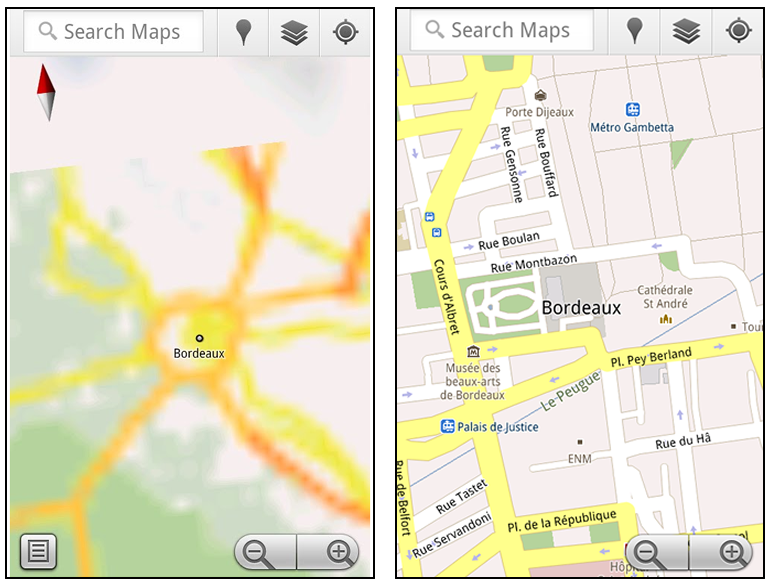
Let’s say later you’re visiting Bordeaux during a trip to France. If you were to open Google Maps for mobile and zoom into Bordeaux without data coverage or wifi, you’d see the image on the left:


Left: Bordeaux with no data or wifi. Right: Bordeaux with downloaded map area

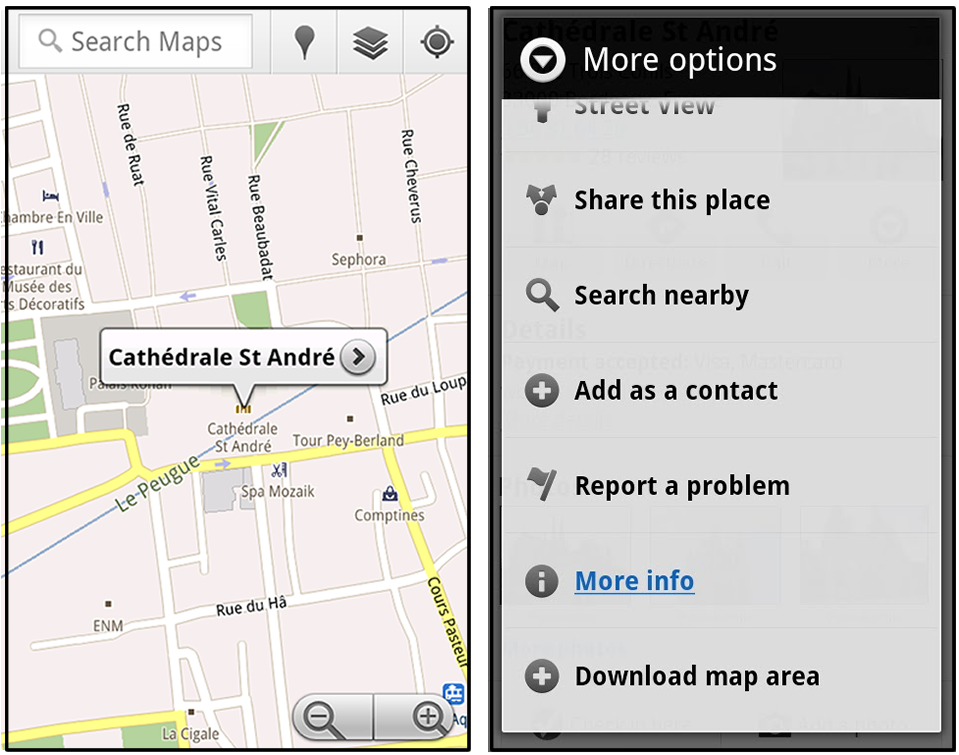
That’s not particularly useful when you’re trying to find out how close you are to the Cathedrale St. Andre. But a little advance planning and “Download map area” can help. Before you take your trip, while you still have access to WiFi or data coverage, you can open up any Places page in the world, click “More” to get the Place page menu, and download Google’s maps for a 10-mile radius.


Left: Tap a landmark to enter its Place page. Right: Place page “more options” menu

The download can take as little as a minute or two. This download stores only the base map tiles and the landmarks on the map, so you still need a data connection to see satellite view and 3D buildings, search for Places and get directions. But we hope the level of detail available will help you find your way!


Left: Status screen for download. Right: Coverage of downloaded map area

All your downloaded map areas can be managed in your Google Maps cache settings so you can delete maps you no longer need or if you want to free up storage. After 30 days, all downloaded map areas will be removed from your cache; they can be re-downloaded any time.

Scale bar
Google Maps has approximately 20 different zoom levels that range from a 2,000 mile scale to a 20 foot scale. With finger gestures making it really quick and easy to zoom in and out, sometimes it’s not always clear what zoom level you’re at. What might be just a few streets away can be quite a long walk depending on the scale. To help with this, you can turn on a scale bar, which updates based on your zoom level.


Scale bar in the lower left

Measure
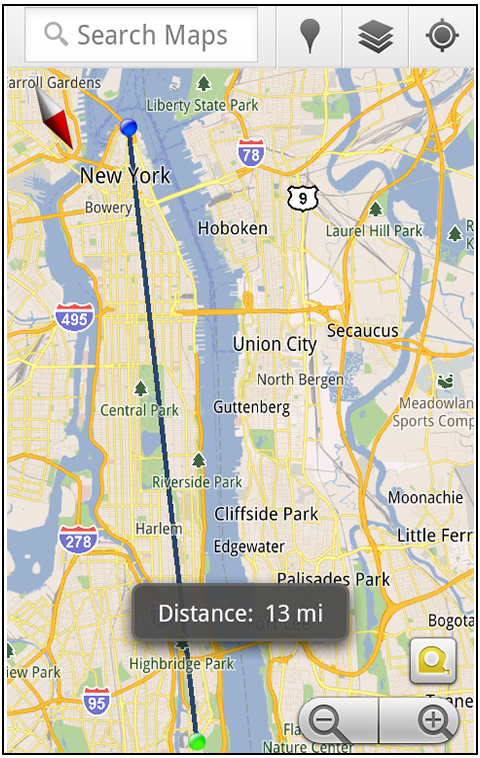
If you ever need to know the distance between San Francisco and New York (about 2602 miles) or between any other two points on the map, the “Measure” lab can help you out. Once it’s enabled, you’ll notice a tape measure icon just above the zoom buttons. After clicking that icon, you’ll be prompted to tap two points on the map and Google Maps will calculate the straight distance between those points (this direct distance is “as the crow flies”).


Example of the “Measure” Labs feature

To access Labs on your phone, press your phone’s menu button once in Google Maps, choose “More” and select Labs. On a tablet, click the menu button in the upper-right corner of Maps. The “Download map area” lab requires Android 2.1+ and the latest version of Google Maps. We look forward to bringing you more experimental features soon and hope you enjoy trying out Labs in Google Maps for Android.

Wednesday, 6 July 2011

Google Maps 5.7 for Android introduces Transit Navigation (Beta) and more

(Cross-posted on the Google Lat Long Blog and the Google Mobile Blog)

Today we’re releasing Google Maps 5.7 for Android. From Bangkok to Baltimore, we’ve added Transit Navigation (Beta), updated access to directions, better suggested search results and a photo viewer to Place pages—all of which can help you whether you’re traveling to an unfamiliar part of town or visiting a city across the world.

Transit Navigation (Beta)
Google Maps Navigation (Beta) currently provides over 12 billion miles of GPS-guided driving and walking directions per year. Now, GPS turn-by-turn (or in this case, stop-by-stop) navigation is available for public transit directions in 400+ cities around the globe with Transit Navigation.


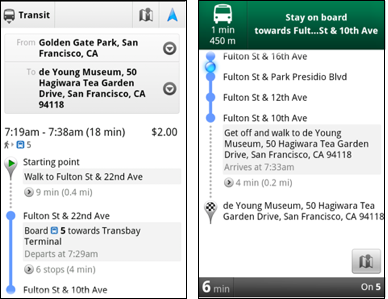
Transit Navigation uses GPS to determine your current location along your route and alerts you when it’s time to get off or make a transfer. This is particularly helpful if you’re in a city where you don’t speak the language and can’t read the route maps or understand the announcements. After starting your trip with Transit Navigation, you can open another application or put your phone away entirely and Google Maps will still display an alert in your notification bar and vibrate your phone when your stop is coming up.


Left: Transit directions without Navigation. Right: with Navigation


Navigation alerts appear even if you switch to another app

Now you can spend more time enjoying the sights out the window and less time worrying about how many stops are left, where you are along the route or whether you missed your stop. Since Transit Navigation relies on GPS signals, we recommend using this feature for above-ground transit.

Updated Directions
Now that we’ve improved our directions services, we wanted them to be incredibly easy to pull up on your screen. If you select the driving or walking icon and your route is supported by Google Maps Navigation, the Navigation icon will automatically appear so you can get access to step-by-step directions in one click. Note: this change is currently only in place for driving and walking and does not appear for public transit.


One-click access to Navigation from directions

We’ve also streamlined how you access directions from within a Place page. Before, clicking directions in a Place page would bring up options for “Driving Navigation,” “Walking Navigation” and “Directions.” Now, you’ll be taken straight to the map and see the new directions box shown above.

Improved Search Suggest
We’ve made two changes to search suggestions that improve their quality and speed. First, we’ve added category icons, so instead of all search suggestions displaying the same icon, the icon next to the listing will reflect the type of result. You’ll see a pin for a Google Places listing, a star for a starred Place or location, a clock for a previously used search term, a person for contacts and a magnifying glass for “anything else.”


Two examples of search suggest with new icons

Also, any place you got directions to or called directly from its Places page will be included as a suggestion for a relevant search. For example, if you recently received directions to the U.S. Post Office on Wilshire Boulevard, afterward, when you begin a search with [p] or [bou], that U.S. Post Office would appear as a search suggestion.

Photo viewer for Place pages
Since we released business photos for Place pages last October, millions of photos have been added to Place pages around the world. To enable you to view these photos on the run, a slick new photo viewer has been added so you can browse photos while deciding where to go.

Left: Business photos in Place pages. Right: New photo viewer

To start using Google Maps 5.7 for Android, download the update here. This update requires an Android OS 2.1+ device and works anywhere Google Maps is currently available. Learn more at our help center and have fun exploring, whether it be by car, transit, bike or foot.

Monday, 27 June 2011

The J. Paul Getty Museum collection comes alive with Google Goggles

The Google Goggles team has worked with The J. Paul Getty Museum in Los Angeles to “Goggles-enable” their permanent collection of paintings. Now you can use the Google Goggles app on your phone to take a photo of any of the paintings in the Getty’s permanent collection and instantly access information about the work from both the Getty’s mobile-optimized webpage about the painting and from around the web. Instead of being limited to the amount of information that fits on the wall next to a painting, Getty museum staff can now share a fuller story that all visitors can enjoy online.

From your phone you can read and hear commentary from artists, curators, conservators or the works of art themselves, such as the anthropomorphic voice of the pig in the Adoration of the Magi. Snap a quick shot of the artwork and have an interactive experience with what is on the wall in front of you—all in in the palm of your hand (just remember to respect museum photography rules and to turn off your flash).


Google Goggles results and the Getty webpage for Portrait of the Sisters Bonaparte

If you want to take your art history lesson home with you, you can store a record of the art you captured by enabling Search History on your Android phone. In fact, anytime you stumble across a piece of art, whether it be a reproduction on a poster or a print in a book, you can take a photo with your phone and Goggles will recognize it and supply you with rich info.

Download Google Goggles for your Android or iOS device as part of the Google Search app, and give it a try if you stop by the Getty. You can also view the J. Paul Getty Museum collection online at http://www.getty.edu/art. For more information about the Getty-Goggles project, visit mobile.getty.edu/gettygoggles or scan the QR code below.


Posted by Shailesh Nalawadi, Product Manager

Wednesday, 8 June 2011

Know when your bus is late with live transit updates in Google Maps

(Cross-posted on the Lat Long Blog and Mobile Blog)

Often when I’m taking public transit, I arrive at my stop on time only to anxiously check my watch and look down the street for my bus, which is running late once again. Those extra minutes I’m forced to wait seem like an eternity, and the only information I can access on my phone is when the bus was supposed to arrive.

Starting now, Google Maps for mobile and desktop can tell you when your ride is actually going to arrive with new live transit updates. We partnered with transit agencies to integrate live transit data in four U.S. cities and two European cities: Boston, Portland, Ore., San Diego, San Francisco, Madrid and Turin.


When you click on a transit station or plan a transit route with Google Maps and there are delays or alerts related to your trip, you’ll now see “live departure times” (indicated with a special icon) and service alerts.

Live transit departure times after tapping on a station

Live service alerts when receiving transit directions

Live departures and alerts on desktop

We’re working with our public transit partners to help them provide live data to more people in more cities. You can get live transit updates in the latest version of Google Maps for mobile (requires Android 1.6+), as well as Google Maps on all supported desktop and mobile browsers.

Thursday, 26 May 2011

Coming soon: make your phone your wallet

(Cross-posted on the Google Commerce Blog and Google Mobile Blog)

Today in our New York City office, along with Citi, MasterCard, First Data and Sprint, we gave a demo of Google Wallet, an app that will make your phone your wallet. You’ll be able to tap, pay and save using your phone and near field communication (NFC). We’re field testing Google Wallet now and plan to release it soon.

Google Wallet is a key part of our ongoing effort to improve shopping for both businesses and consumers. It’s aimed at making it easier for you to pay for and save on the goods you want, while giving merchants more ways to offer coupons and loyalty programs to customers, as well as bridging the gap between online and offline commerce.

Because Google Wallet is a mobile app, it will do more than a regular wallet ever could. You'll be able to store your credit cards, offers, loyalty cards and gift cards, but without the bulk. When you tap to pay, your phone will also automatically redeem offers and earn loyalty points for you. Someday, even things like boarding passes, tickets, ID and keys could be stored in Google Wallet.


At first, Google Wallet will support both Citi MasterCard and a Google Prepaid Card, which you’ll be able to fund with almost any payment card. From the outset, you’ll be able to tap your phone to pay wherever MasterCard PayPass is accepted. Google Wallet will also sync your Google Offers, which you’ll be able to redeem via NFC at participating SingleTap™ merchants, or by showing the barcode as you check out. Many merchants are working to integrate their offers and loyalty programs with Google Wallet.

With Google Wallet, we’re building an open commerce ecosystem, and we’re planning to develop APIs that will enable integration with numerous partners. In the beginning, Google Wallet will be compatible with Nexus S 4G by Google, available on Sprint. Over time, we plan on expanding support to more phones.

To learn more please visit our Google Wallet website at www.google.com/wallet.

This is just the start of what has already been a great adventure towards the future of mobile shopping. We’re incredibly excited and hope you are, too.

Wednesday, 25 May 2011

AdMob celebrates one year at Google as mobile growth accelerates

As we approach the first anniversary of AdMob’s arrival at Google this Friday, it’s amazing to look at how much the mobile industry has grown since last year: an estimated 300 million smartphones were shipped, average smartphone data-usage doubled and hundreds of thousands of new mobile apps have been created.

Many thousands of mobile publishers and developers use ads to support their businesses, so we’re excited to see rapid growth in mobile advertising, too. For example, in the last year, traffic on the AdMob network has grown more than three and a half times, and we now get more than 2.7 billion ad requests every day. We have thousands of advertisers both large and small getting great results every day on AdMob’s network of more than 80,000 mobile apps and sites. To celebrate AdMob’s first year at Google, today we’re introducing a set of new products and features for mobile advertisers and publishers.

New ad formats for tablets
In the last six months alone, traffic from tablets on the AdMob network has increased by 300 percent. To help advertisers better connect with tablet users, today we’re launching a variety of new, tablet-specific rich media ad formats. These new HTML5-based ad formats are built specifically for tablets’ larger, high-definition screens, and make use of features like touch, tap and swipe. Together, these features will enable advertisers to develop rich, engaging campaigns and run them across multiple mobile platforms.


Enhanced tools for mobile app developers
To help app developers grow their app businesses, we’re releasing a significant upgrade to our AdMob “House Ads” product, which developers can use to promote their own products within their mobile apps. The new version includes improved campaign management, new ad formats and better ad targeting options.

In the coming months, we’ll also improve mobile app developers’ ability to use AdMob to deliver the most valuable ad by integrating a new “mediation” feature that selects the best ad from multiple, competing ad networks directly into the Google AdMob Ads SDK.

Deeper integration with Google advertising products
Many advertisers, agencies and publishers use DoubleClick’s ad serving and measurement tools to manage their digital ad campaigns. We envision a single platform that enables seamless management of ads across desktop, video, mobile and tablets. Our announcement earlier this week about the availability of DoubleClick Rich Media ads on the AdMob Network on the AdMob network is one example of this commitment. In a few weeks, we’ll also add support for mobile to our DoubleClick for Publishers (DFP) Small Business ad serving product, which thousands of web publishers use today to manage ads that appear on their sites.

The last year has seen incredible growth, but it’s just the beginning. We believe that the products we’re announcing today will further accelerate the growth of mobile advertising, enable marketers and developers to rapidly grow their businesses and help to fund more great mobile content and apps for users.

Tuesday, 10 May 2011

Android: momentum, mobile and more at Google I/O

(Cross-posted on the Google Code Blog)

This morning at Google I/O, the Android team shared some updates. It’s hard to believe a little more than two and a half years ago, we were just one device, launching in one country, on one carrier. Thanks to the ecosystem of manufacturers, developers and carriers, the platform has grown exponentially. There are now:
  • 100 million activated Android devices
  • 400,000 new Android devices activated every day
  • 200,000 free and paid applications available in Android Market
  • 4.5 billion applications installed from Android Market
Mobile—one OS everywhere
Over the past two and a half years, we’ve shipped eight releases of Android and there are now more than 310 Android devices around the world, of all shapes and sizes. This morning we talked about our next version of Android, Ice Cream Sandwich. Our goal with Ice Cream Sandwich is to deliver one operating system that works everywhere, regardless of device. Ice Cream Sandwich will bring everything you love about Honeycomb on your tablet to your phone, including the holographic user interface, more multitasking, the new launcher and richer widgets.

We also launched Music Beta by Google, a new service that lets you upload your personal music collection to the cloud for streaming to your computer and Android devices. With the new service, your music and playlists are automatically kept in sync, so if you create a new playlist on your phone, it’s instantly available on your computer or tablet. You can use a feature called Instant Mix to create a playlist of songs that go well together. You can even listen to music when you’re offline: we automatically store your most recently played music on your Android device and you can choose to make specific albums or playlists available when you’re not connected. The service is launching in beta today to U.S. users and is available by invitation.


We’ve also added Movies for rent to Android Market. You can choose to rent from thousands of movies starting at $1.99 and have them available across your Android devices—rent a movie on your home computer, and it’ll be available for viewing on your tablet or phone. You can rent from Android Market on the web today, and we’ll be rolling out an update to Verizon XOOM customers beginning today. We’ll start rolling out the update to Android 2.2 and above devices in the coming weeks.

The Android ecosystem has been moving really fast over the last two and a half years and rapid iteration on new and highly-requested features has been a driving force behind Android’s success. But of course that innovation only matters if it reaches consumers. So today we’re announcing that a founding team of industry leaders, including many from the Open Handset Alliance, are working together to adopt guidelines for how quickly devices are updated after a new platform release, and also for how long they will continue to be updated. The founding partners are Verizon, HTC, Samsung, Sprint, Sony Ericsson, LG, T-Mobile, Vodafone, Motorola and AT&T, and we welcome others to join us. To start, we're jointly announcing that new devices from participating partners will receive the latest Android platform upgrades for 18 months after the device is first released, as long as the hardware allows...and that's just the beginning. Stay tuned for more details.

More—extending the platform beyond mobile
From the beginning, Android was designed to extend beyond the mobile phone. With that in mind, we’ve developed Android Open Accessory to help developers start building new hardware accessories that will work across all Android devices. We previewed an initiative called Android@Home, which allows Android apps to discover, connect and communicate with appliances and devices in your home. We also showed a preview of Project Tungsten, an Android device for Music Beta to give you more control over music playback within the Android@Home network.

You can watch the entire Android keynote from Google I/O on our Google Developer YouTube Channel shortly. On behalf of the team, we want to thank the entire Android community of developers, OEMs and carriers who are pushing the platform into new areas and building great experiences for consumers. Without you, the Android platform wouldn’t have grown so large in the past two and a half years. We look forward to seeing where you take it next.

Update May 11: The video from the keynote is now available:


Monday, 21 March 2011

Sprint integrates Google Voice

(Cross-posted from the Google Voice Blog)

Over time, we've worked to bring an integrated Google Voice experience to your mobile device by building mobile apps, introducing Google Voice Lite, and most recently Number Porting. But we felt that ultimately, the most simple solution would be to partner with carriers to seamlessly integrate Google Voice with your mobile phone.

Today, we’d like to share that we’ve teamed up with Sprint to do just that.

First, Sprint customers will be able to use their existing Sprint mobile number as their Google Voice number and have it ring multiple other phones simultaneously. So now, calls to your Sprint mobile number can easily be answered from your office or your home phone, or even your computer through Gmail. Calls from Gmail and text messages sent from google.com/voice will also display your Sprint number. This basically gives Sprint customers all the benefits of Google Voice without the need to change or port their number.

Alternatively, Google Voice users can choose to replace their Sprint number with their Google Voice number when placing calls or sending text messages from their Sprint handset. This feature works on all Sprint phones and gives Sprint users all the benefits of Google Voice without the need for an app.

In both cases, Google Voice replaces Sprint voicemail, giving Sprint customers transcribed voicemail messages available online and sent via email and/or text message. International calls made from Google Voice users’ Sprint phones will be connected by Google Voice at our very low rates, and Sprint customers will also have access to the rest of Google Voice’s features, like creating personalized voicemail greetings based on who’s calling, call recording, blocking unwanted callers and more.

To learn more, watch the video below and visit google.com/voice/sprint.


This feature will be available soon to Sprint customers in the United States. Once it is launched, it will be rolled out gradually to all Google Voice users, and can be enabled through the Google Voice website. If you don’t see it right away, don’t worry—you can leave your email address at google.com/voice/sprint and we’ll notify you as soon as this becomes available.

In addition, today we’re introducing the Nexus S 4G for Sprint—which takes advantage of Sprint’s high-speed 4G data network and lets you enable Google Voice directly from the mobile app. Learn more on the Google Mobile Blog.

Tuesday, 8 March 2011

Instant Previews now available on mobile

(Cross-posted from the Mobile Blog)

Instant Previews provides a fast and interactive way to evaluate search results. Starting today, Google Instant Previews is available on mobile for Android (2.2+) and iOS (4.0+) devices across 38 languages. Similar to the desktop version of Instant Previews, you can visually compare search results from webpage snapshots, making it easier to choose the right result faster, especially when you have an idea of the content you’d like to see.

For example, if you’re looking for a webpage that has both photos and descriptions, you can use Instant Previews to quickly identify these pages by navigating across the visual search results with a few swipes of your finger. Or perhaps you’re looking for an article, a step-by-step instructions list, or a product comparison chart—with Instant Previews, you can see easily spot pages with the right content without having to navigate back and forth between websites and search results. And when the mobile version of a website is available, we’ll show you a preview of the mobile page.


To use Instant Previews on your mobile device, do a search on www.google.com and tap on the magnifying glass next to any search result. A side-by-side comparison view of the webpage previews for the first page of search results will appear. When you find a result you like, tap on the preview to go straight to the website. It’s as easy as finding a recipe for poaching an egg:


You can learn more about Instant Previews for mobile in our Help Center. We hope you enjoy finding the right result faster with Instant Previews!

Monday, 7 March 2011

You’ve got better things to do than wait in traffic

(Cross-posted on the LatLong Blog and Mobile Blog)

Ever been stuck in traffic, only to find out you’d have been better off going a bit out of your way to take a less congested route? If you’re like me, you probably hear the traffic report telling you what you already know: traffic is bad on the road you’re currently on, and you should have taken another. It doesn’t need to be this way, and we want to help. So we’re happy to announce that Google Maps Navigation (Beta) will now automatically route you around traffic. With more than 35 million miles driven by Navigation users every day, this should add up to quite a bit of time saved!

On a recent trip to New York, I was running late to meet some friends at the Queens Museum of Art. I had no idea that there was a traffic jam along the route I would normally have taken. Thankfully, Navigation routed me around traffic. I didn’t even have to know that there was a traffic jam on I-495, and I got to enjoy a much faster trip on I-278 instead.


Navigation now uses real-time traffic conditions to automatically route you around traffic.


You don’t have to do anything to be routed around traffic; just start Navigation like you normally would, either from the Navigation app or from within Google Maps. Before today, Navigation would choose whichever route was fastest, without taking current traffic conditions into account. It would also generate additional alternate directions, such as the shortest route or one that uses highways instead of side roads. Starting today, our routing algorithms will also apply our knowledge of current and historical traffic to select the fastest route from those alternates. That means that Navigation will automatically guide you along the best route given the current traffic conditions.

Not only can you save time and fuel, you’re making traffic better for everyone else by avoiding traffic jams. Keep in mind that we can’t guarantee that Navigation will be able to find a faster way, but it will always try to get you where you’re going as fast as possible.

You can begin routing around traffic with Google Maps Navigation for Android in North America and Europe where both Navigation and real-time traffic data are available.

Enjoy your newly found free time!

Wednesday, 9 February 2011

Dialed up: the rapid launch and growth of Click-to-Call

This post is the first in our series profiling entrepreneurial Googlers working on products across the company and around the world. Here, you’ll get an in-depth look at how one of our most successful mobile advertising features was launched by one and a half engineers in a matter of months. -Ed.

I’ll always remember my first cell phone—a big, black brick that was really only good for making calls. While technology certainly has advanced since then, I still appreciate the speed of connecting to people and businesses instantly over the phone, something that I found harder and harder to do when I searched, for example, for the number of a restaurant to make a reservation.

So in June of 2009, a few engineers and I pooled our 20% time and worked to develop a prototype of what would eventually become Click-to-Call for smartphones, an ad unit that makes it easier for people to connect to a business by phone, rather than through a website.


Building the feature was the easy part; essentially, we developed an ad extension that allows advertisers to include a phone or location in their campaigns. However, it was launching it to advertisers that posed the biggest challenge.

With new products like Click-to-Call, we often choose to launch in beta, and incrementally roll out the features to a small subset of users, usually beginning at a 1% test and increasing from there. With Click-to-Call, we’d developed a mobile feature that we wanted to launch as soon as possible, but since mobile advertising was much smaller at that point—then with only about one-sixth as many search queries we get today—we calculated that it would take nearly three years to roll out to 10% and around 10 years to actually launch it. At that rate, the feature would likely become antiquated long before it ever officially launched.

So I decided not to follow the usual process and took a risk, choosing to launch to 50% of Google’s mobile advertisers within the first week. In my view, there was simply no other way to collect enough feedback in a short period of time so that we could quickly iterate based on feedback. Thousands of advertisers—an unprecedented amount for a brand-new feature—were on board to try it out, and with a few engineers and some pretty massive spreadsheets, we started to see real results. Within a month, we had the magical ingredient—momentum—and from there we were collecting enough feedback to be on track to bring the feature to all advertisers in a matter of months.


This is one of the reasons I work at Google. Google gives me freedom to experiment, ownership of my ideas, and amazing resources and support. We built Click-to-Call in June 2009, began testing it in July, and had it up and running for all advertisers in January 2010. One year later, Click-to-Call ads on both search and the Google Display Network are generating millions of calls every month on mobile phones and driving strong performance for advertisers.

If you’re interested in exploring some of the most significant trends in mobile, you can watch our Think Mobile livestream this Thursday, February 10 at 1:05pm EST, where we’ll discuss why it’s “not too late for businesses to still be early” in this space.

Tuesday, 8 February 2011

Introducing the Google Translate app for iPhone

(Cross-posted from the Google Mobile Blog)

Back in August 2008, we launched a Google Translate HTML5 web app for iPhone users. Today, the official Google Translate for iPhone app is available for download from the App Store. The new app has all of the features of the web app, plus some significant new additions designed to improve your overall translation experience.

Speak to translate
The new app accepts voice input for 15 languages, and—just like the web app—you can translate a word or phrase into one of more than 50 languages. For voice input, just press the microphone icon next to the text box and say what you want to translate.


Listen to your translations
You can also listen to your translations spoken out loud in one of 23 different languages. This feature uses the same new speech synthesizer voices as the desktop version of Google Translate we introduced last month.


Full-screen mode
Another feature that might come in handy is the ability to easily enlarge the translated text to full-screen size. This way, it’s much easier to read the text on the screen, or show the translation to the person you are communicating with. Just tap on the zoom icon to quickly zoom in.


And the app also includes all of the major features of the web app, including the ability to view dictionary results for single words, access your starred translations and translation history even when offline, and support romanized text like Pinyin and Romaji.

You can download Google Translate now from the App Store globally. The app is available in all iOS supported languages, but you’ll need an iPhone or iPod touch iOS version 3 or later.

Monday, 7 February 2011

Mobile now! Helping businesses succeed in the mobile era

(Cross-posted on the Mobile Ads Blog)

By the end of 2011, an estimated one billion people around the world will be connected to the mobile web and 50% of all Americans will own a smartphone. Because of the explosion of web-enabled mobile devices, mobile usage is now on a hockey-stick trajectory: searches on smartphones and tablets have increased by 4x in the last year, and the world of mobile apps continues to engage mobile users—125 years’ worth of Angry Birds are played every day!

For people everywhere, the mobile era has begun.

Yet most businesses haven’t adapted their online strategies—advertising, webpage design, commerce—to mobile. The opportunity for these businesses is huge and we want everyone to be able to take part. On February 10, we’re hosting an event at our New York office called “ThinkMobile”: Mary Meeker, Partner at Kleiner Perkins, and our own Dennis Woodside, SVP, Americas Operations and Jason Spero, Head of Mobile, Americas, will explore some of the most significant trends in mobile and explain why it’s “not too late for businesses to still be early” in this space. We invite you to livestream these talks at 1pm ET/10am PT this Thursday on desktop, or—for the first time from a Google event in the U.S.—on both Android and iOS mobile devices as well. In other words, you can Think Mobile....on mobile!

Right now, advertisers engaging on mobile are increasing brand awareness, purchase intent and sales with effective mobile search and display campaigns. Mobile developers and publishers are supporting very profitable businesses with advertising revenue. And consumers are benefiting from relevant and useful ads on their mobile devices.

To help all businesses take advantage of the opportunities that mobile advertising presents, we’re focusing on three core principles with our mobile ads business:
  • Seamless: We’re bringing the best characteristics of desktop advertising to mobile devices. We want to help marketers and developers extend the benefits of their desktop advertising to people on mobile devices, while effectively managing their campaigns and ad space across many channels.

  • Inclusive: It’s clear that mobile is about more than just one device, one type of ad format or one style of ad campaign. Our ad solutions span across search, text, display, video, commerce and more, on a wide variety of devices, and enable businesses and consumers to connect in newly relevant and useful ways.


  • Made for mobile: Mobile devices have unique characteristics like location awareness and touch screens (and the ability to make phone calls!) that make it easy for people to engage with information conveniently, and create unique opportunities for businesses as well. Our ad solutions are built to help marketers, developers and publishers take advantage of these mobile-specific characteristics.


The power of constant connectivity on mobile is a thrilling new reality, and has already transformed the way people engage with information, businesses and certainly with each other. We’re just now scratching the surface of what’s possible on mobile. This is an exciting time, and there’s much more to come.

Tuesday, 1 February 2011

Check in with Google Latitude

(Cross-posted on the Mobile Blog and LatLong Blog)

We first introduced Google Latitude to help you stay in touch with your friends and family by making it easy to share where you are. For the 10 million people actively using Latitude each month, this “where” has been a location on a map. Starting today in Google Maps 5.1 for Android, you can also connect that location to a real place by checking in there using Latitude.

Connecting your location with places
You can still use Latitude to automatically update and share your location, but check-ins let you add context to the location—like captions to a photo. For example, I live in San Francisco but often travel around the world. Until today, sharing my location let friends and family know if I was across the globe or in their neighborhood. Now, check-ins let them see the cool restaurant I’m trying in Taipei or join me for a latte at the cafe nearby.
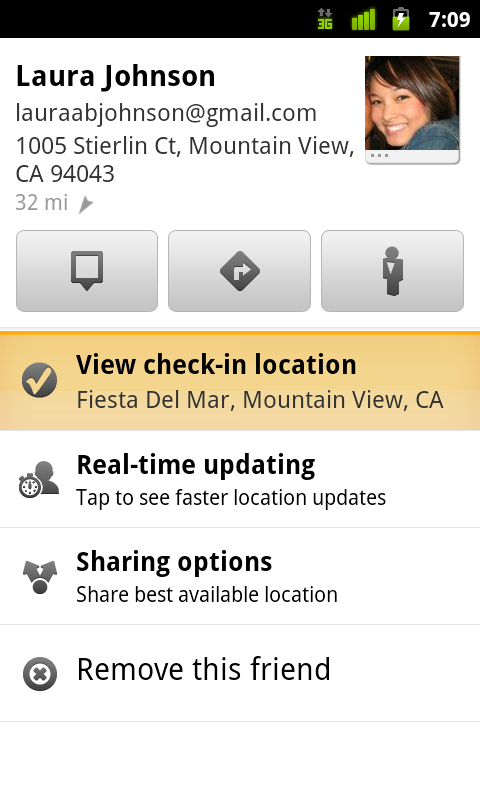
See where your friends are on a map and where they’re checking in.

Not your typical check-ins
Because you can use Latitude to automatically detect your location, we’ve added a few twists to checking in to make it really easy:
  • Notifications: Turn on check-in notifications in Latitude’s settings and get a notification to check in at a nearby place once you arrive. Never forget to check in again.
  • Automatic check-ins: Choose to automatically check in at specific places you designate, and you’ll be checked in when you’re there. You can talk to friends or finish your bagel without fumbling with your phone.
  • Check out: Once you leave, Latitude knows to automatically check you out of places so friends aren’t left guessing if you’re still there.


Explore your world one check-in at a time
Latitude is built right into Google Maps for Android so check-ins work across Latitude and Maps seamlessly. For example, check in at that new hamburger joint, and you’ll see its Place page with reviews to help you order. When friends check in at a place, you can go straight from their Latitude profile to its Place page to learn about it, fire up Google Maps Navigation (Beta) for turn-by-turn directions to them, and more.

You can also check in at a favorite place to earn special status there; you’ll see if you’ve become a “Regular,” a “VIP” or a “Guru” on its Place page. Keep checking in to hold onto your status or reach the next level.

Latitude check-ins are built right into Google Maps and Place pages.

Of course, we thought carefully about how to make checking in to places quick and easy while giving you control over your privacy. Just like when sharing your location with Latitude, checking in is 100% opt-in, and you can choose to share any check-in with your friends on Latitude, publicly on the web and your Google profile, or just yourself. Learn more about checking in and managing your check-ins with Latitude in the Help Center. Coming later this week, you’ll also be able to see your complete history of check-ins using the optional History tab at google.com/latitude from your computer.

Choose options for individual check-ins or turn on and off notifications in the Latitude settings.

Start checking in by downloading the latest Google Maps from Android Market (on Android 1.6+; tap here if you're on your phone) and then joining Latitude from the main menu. You can check in everywhere Maps and Latitude are already available. If you’re using the new Latitude app for iPhone, you’ll see your friends’ check-ins, and we’ll update the app soon so you can check in too.

Just the beginning...
Checking in from Latitude is just one step in helping you connect the places you go with the people you care about. We believe in letting you use or share your location however you like, and we’re working on making location and check-ins useful in more places—across Google and the web.