Monday, 11 July 2011

The first Google eBooks-integrated e-reader: iriver Story HD

(Cross-posted from the Inside Google Books Blog and the Google Commerce blog)

Starting this coming Sunday, July 17, the iriver Story HD e-reader will be available for sale in Target stores nationwide and on Target.com. The iriver Story HD is the first e-reader integrated with the open Google eBooks platform, through which you can buy and read Google eBooks over Wi-Fi.


The iriver Story HD, which retails for $139.99, is slim and lightweight with a high-resolution E Ink screen and a QWERTY keyboard for easy searching. It includes over-the-air access to hundreds of thousands of Google eBooks for sale and more than 3 million for free. With the Story HD you can now browse, buy and read Google eBooks with your e-reader through Wi-Fi, rather than downloading and transferring them from computer to e-reader with a cord as you can already do with more than 80 compatible devices.

We built the Google eBooks platform to be open to all publishers, retailers and manufacturers. Manufacturers like iriver can use Google Books APIs and services to connect their devices to the full Google eBooks catalog for out-of-the-box access to a complete ebookstore. You can also store your personal ebooks library in the cloud—picking up where you left off in any ebook you’re reading as you move from laptop to smartphone to e-reader to tablet.

In December, Google eBooks launched with the ability to read Google eBooks on any device with a modern browser, on Android and iOS devices using the Google Books mobile apps, through our Chrome Web Store app and on compatible ereaders. Since then, we’ve added new retailers—growing to include more than 250 independent bookstores—and made Google eBooks available in Android Market. We’ve also extended our affiliate network and updated our family of Google Books APIs.

The Story HD is a new milestone for us, as iriver becomes the first manufacturer to launch an e-reader integrated with Google eBooks. You can learn more about the Story HD on the iriver website.

Stay tuned for more Google eBooks-integrated devices to come. If you’re a manufacturer interested in integrating your next device with the Google eBooks e-commerce platform, please contact us at books-devices-request@google.com.

Update 7/13: We've corrected the word "e-ink" to the more precise "E Ink" as that is the technology brand used in the device's high resolution screen.

Thursday, 7 July 2011

Seeking the Americas’ brightest young minds for a spot at Zeitgeist Americas 2011

This year, we’re mixing up our annual Zeitgeist conferences with the launch of Young Minds, a competition hosted by youth engagement agency Livity, supported by Google and hosted on YouTube. Starting this week, we’re searching for 12 inspirational young people who are making an impact on their world to attend Zeitgeist Americas 2011—our annual gathering of 400+ businesses and thought leaders from across the continent held each year in Paradise Valley, Ariz.

The winners will be invited to the two-day event, where they’ll take part in a series of tailored master classes hosted by Google and meet some of the most powerful and thought-provoking people on the planet. We want the pioneers, changemakers and leaders of tomorrow to take their place alongside the greatest minds of today and use Zeitgeist as a springboard from which they can continue to do amazing things to make the world a better place.

The Young Minds competition is open to people aged 18-24 from the U.S., Canada, Mexico, Brazil, and Argentina. For your chance to win a slot at Zeitgeist Americas 2011, go to www.zeitgeistyoungminds.com before August 25 and upload a video that shows us how you’re making a positive impact on the world.

Update 7/8: Although previously stated that this competition was open to all of the Americas, please note that it is only open to people from the U.S., Canada, Mexico, Brazil and Argentina.

“Download map area” added to Labs in Google Maps for Android

(Cross-posted from the Mobile and Lat Long Blogs)

One way we bring you new product features is through Google Labs—a collection of fun, experimental features you can turn on if you’re interested in the functionality. In fact, Google Maps itself started as a lab. In addition to our desktop Maps Labs, Google Maps for Android has a few tricks you can try out right from your phone. We’d like to introduce you to one new experimental feature, “Download map area," but also remind you of two other ones we already have: “Scale bar” and “Measure.”

Download map area
When you’re visiting an unfamiliar location, Google Maps for mobile is great for getting an idea of how close you are to your destination, where streets and landmarks are in relation to each other, or just for getting “un-lost.” But what if you don’t have a data signal, or you’re abroad and don’t have a data plan? We say that if you use Google Maps for mobile, you’ll never need to carry a paper map again. The “Download map area” lab in Google Maps 5.7 for Android is a step in making that statement true even when you’re offline.

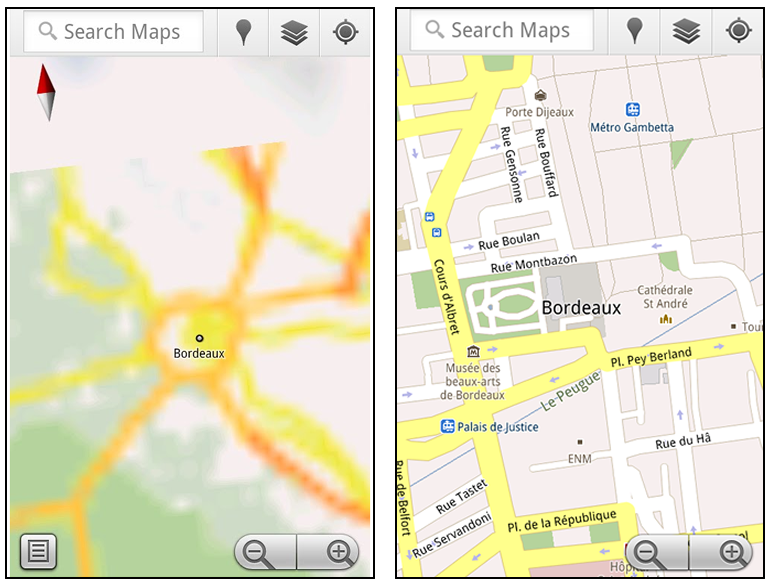
Let’s say later you’re visiting Bordeaux during a trip to France. If you were to open Google Maps for mobile and zoom into Bordeaux without data coverage or wifi, you’d see the image on the left:


Left: Bordeaux with no data or wifi. Right: Bordeaux with downloaded map area

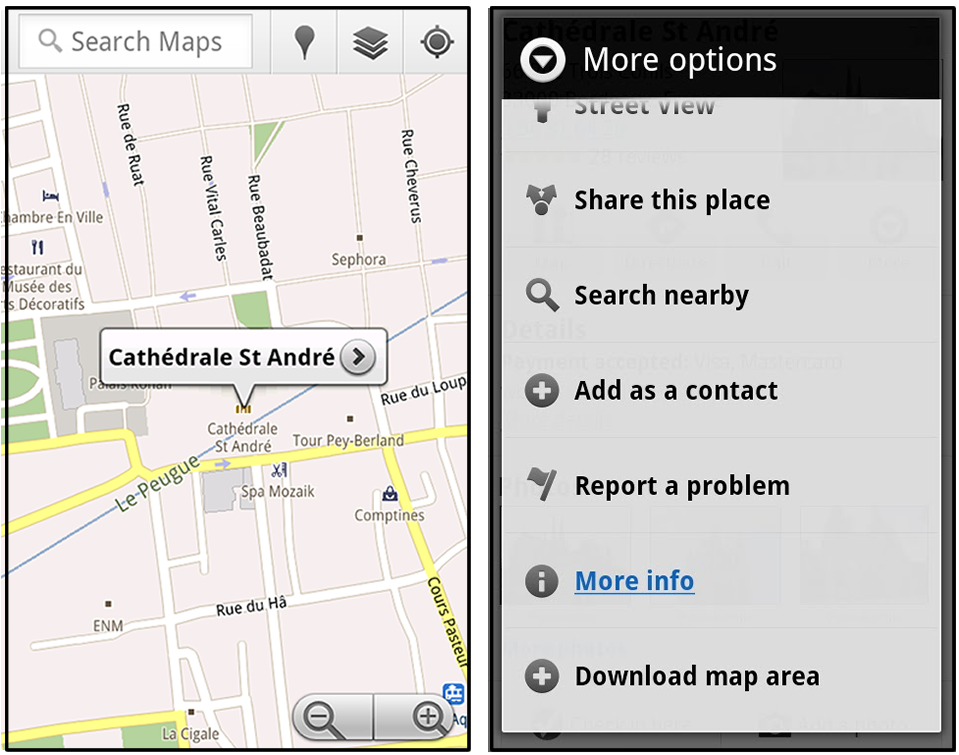
That’s not particularly useful when you’re trying to find out how close you are to the Cathedrale St. Andre. But a little advance planning and “Download map area” can help. Before you take your trip, while you still have access to WiFi or data coverage, you can open up any Places page in the world, click “More” to get the Place page menu, and download Google’s maps for a 10-mile radius.


Left: Tap a landmark to enter its Place page. Right: Place page “more options” menu

The download can take as little as a minute or two. This download stores only the base map tiles and the landmarks on the map, so you still need a data connection to see satellite view and 3D buildings, search for Places and get directions. But we hope the level of detail available will help you find your way!


Left: Status screen for download. Right: Coverage of downloaded map area

All your downloaded map areas can be managed in your Google Maps cache settings so you can delete maps you no longer need or if you want to free up storage. After 30 days, all downloaded map areas will be removed from your cache; they can be re-downloaded any time.

Scale bar
Google Maps has approximately 20 different zoom levels that range from a 2,000 mile scale to a 20 foot scale. With finger gestures making it really quick and easy to zoom in and out, sometimes it’s not always clear what zoom level you’re at. What might be just a few streets away can be quite a long walk depending on the scale. To help with this, you can turn on a scale bar, which updates based on your zoom level.


Scale bar in the lower left

Measure
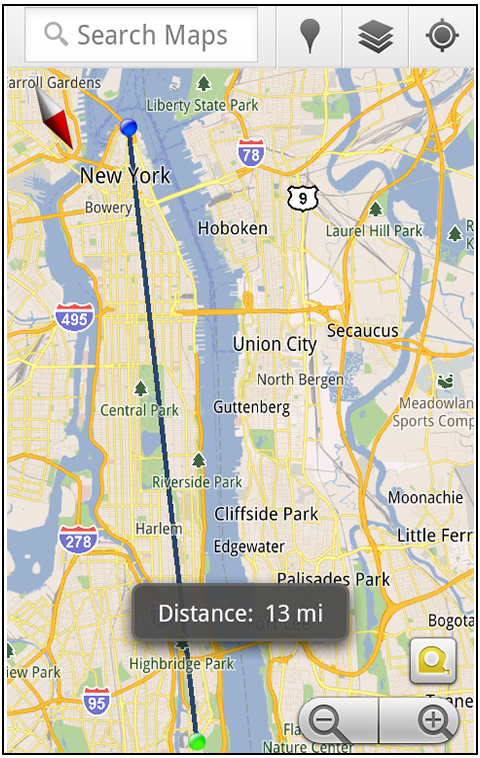
If you ever need to know the distance between San Francisco and New York (about 2602 miles) or between any other two points on the map, the “Measure” lab can help you out. Once it’s enabled, you’ll notice a tape measure icon just above the zoom buttons. After clicking that icon, you’ll be prompted to tap two points on the map and Google Maps will calculate the straight distance between those points (this direct distance is “as the crow flies”).


Example of the “Measure” Labs feature

To access Labs on your phone, press your phone’s menu button once in Google Maps, choose “More” and select Labs. On a tablet, click the menu button in the upper-right corner of Maps. The “Download map area” lab requires Android 2.1+ and the latest version of Google Maps. We look forward to bringing you more experimental features soon and hope you enjoy trying out Labs in Google Maps for Android.