Showing posts with label Google Places. Show all posts

Friday, 4 February 2011

Tips for creating a free business listing in Google Places: Adding useful descriptions and relevant categories

With this blog post, we’re concluding our three part series about the Google Places quality guidelines. Today, we’ll discuss how to choose the best fitting categories for your business listing as well as how to provide a useful description. In case you missed the first two blog posts, you can find here the first post about business titles and here the second part about business types.

Adding useful descriptions

As a business owner, we encourage you to add a specific description of your business in the “description” field. This gives potential clients more information to understand what your business is about and see if your business matches what they are seeking. You can also use this field to provide further guidance about the location of your business which might be useful in some cases where it is hard to find, e.g. if the entrance of your business is only accessible via the rear.

Keep the description clean and concise, so it is helpful to users and catches their attention. A series of repeated keywords or categories may turn off potential customers, but a crisp and catchy summary of the services you offer help users determine if your business is right for them.


Choosing relevant categories

If you provide appropriate and accurate categories, we can better match your business listing to relevant user searches. We recommend choosing specific categories that describe the core of your business well instead of broad ones. A good way to find representative categories for your business is asking yourself the question “What is my business?” Be sure to capture what your business is as opposed to what it offers or sells - in that sense, “bakery” would be a good category as opposed to “cakes” or “bread”.

Also, do not include location information in the categories field. If you would like to provide such additional information about your business, you can use the description field and, if appropriate, the service areas feature.

You will be asked to choose at least one category from our standard list - just start typing in the categories field to see what is available via the auto-suggestions.


We recommend always choosing the best matching and most specific category for your business - for any specific category, Google will be able to automatically determine the more generic category as well. That means, if you are a Mexican restaurant, you should go for ‘Mexican Restaurant’ and not ‘Restaurant’ - Google then automatically knows that if you are a Mexican restaurant, you are also a restaurant.

You can provide up to five categories for your business listing. After picking a standard category, you can add up to four customized categories. To add another category, just click on ‘Add another category’ and an additional field will be triggered. Put only one category per entry field. Entering more than one category into a category field is not compliant with our quality guidelines and could result in your listing being suspended and not appearing in Google Places. In case you find it difficult to find an appropriate standard category to start with, just pick a category that fits best and add more specific custom categories. If you are uncertain about categorizing your business, you can also ask for advice in the Google Places help forum and discuss with other business owners.


We hope that this information helps you add a concise description and accurate categories to your business listing in Google Places. This gives potential clients more information to determine if your business matches what they are seeking. For further questions you can visit our Google Places help forum.


Posted by Sabine Borsay, Consumer Operations

Monday, 31 January 2011

Tips for creating a free business listing in Google Places: business types

Are you curious about what kind of businesses are eligible to appear in the free listings that appear on Google and Google Maps? In this second post in our blog series about how to create a clear and effective business listing via Google Places, we’ll help you to determine if Google Places is right for your business.

Business types and models that work with Google Places

Google Places is meant to facilitate customer interaction with brick-and-mortar businesses and service providers. Therefore, the business owner or employee who is officially authorized to represent their particular business location must have a physical address in order to comply with our quality guidelines.

Having a physical address means that your business has a specific location (typically including a street name and a street number), can be visited by potential customers or business partners, and has a specific phone number at that location where you can be reached during operating hours. Including your physical address in your free business listing helps customers figure out where they can find you.


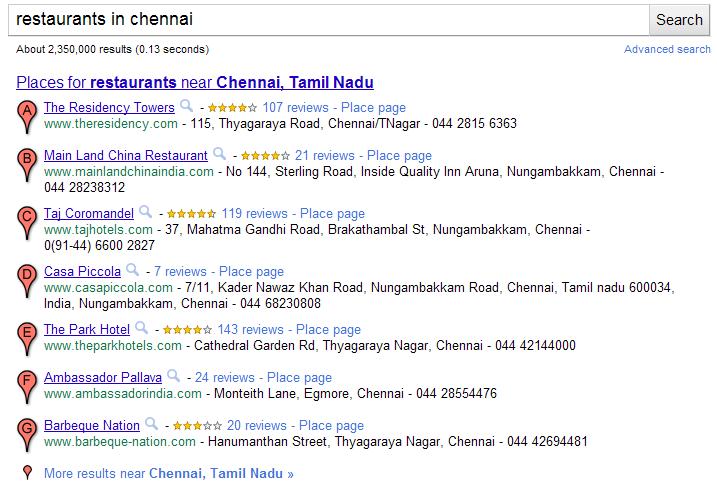
Examples of business listings displayed on Google Maps


Businesses that aren’t right for Google Places

Here are a few examples of business types that are not currently eligible to use Google Places:
  • Web shops that operate exclusively online and have no office for visitor traffic or direct client interaction
  • Businesses without actual physical locations (your living room, the airfield where you offer paragliding lessons, nor the river where your rafting tours start do not qualify as business locations)
  • Companies with non-permanent locations like a farmers market stall, a mobile hot dog vendor, or a one-time concert event at a local cafĂ©
  • Real estate companies that don’t have a central office and are trying to advertise individual apartments where no one can be reached in person or by phone

For operations like these, rather than appearing in Google and Google Maps search results associated with a physical location, other online tools might better fit your needs. One option is to advertise and generate awareness about your business activities through Google AdWords. This cost-effective program enables you to get the word out about your business, website or event via online ad campaigns, and does not require you to have a brick-and-mortar business address.

How to create a free listing if you’re eligible

If you’re a business with a physical office location that is open to customers and staffed both in person and via phone during regular business hours, we encourage you to create a free listing by signing in to Google Places here. For example, a real estate company with a corporate office can add the services it offers, the apartments it sells, and so on in the description field of the listing.


Be careful to create just one listing per physical location and to create listings only at places where your business is actually located. For example, if you run a DJ service and your office is at # 47 MK Road in Chennai, you should only add that location in Google Places, even if you also DJ at # 21 BG Road and at # 62 KT Street.

How to indicate service areas

For businesses that have one physical location but also offer their services elsewhere - such as the aforementioned businesses as well as locksmiths, translation services, delivery pizzerias, cleaning services and the like - you can use the Service Areas feature in your Google Places account. Marking a service area enables you to show your potential customers the range of places where you work.


Businesses that require travel to meet customers can define a radius around their main location or select specific areas they serve. If your main location is your home address and only used to receive business-related mail and phone calls, you can also hide that address and only show the service area in which you operate. This might be the case for babysitters, DJs, household services or IT repair services. Detailed instructions about how to set up this feature can be found in our help center.

Taxi and courier companies are particularly good examples for the use of the Service Areas feature. They offer a service that is location-independent and therefore shouldn't be associated with fixed locations on Google Maps. Even if you can find taxis often in front of train stations or airports, these are not locations owned by the business. The service area feature allows taxis to indicate the area in which they operate. If the taxis are coordinated over a dispatch centre, that can be listed as one physical location, otherwise the address should be hidden.

How to verify a listing

In order for your free business listing to appear on Google and Google Maps, you must verify your business via Google Places. This simple process includes providing a verification code by mail, automated call or text message. The phone number used for this process will be shown in your listing, so be sure that the number directs calls to your business.

We hope this information helps to explain our Google Places quality guidelines around setting up a free business listing. If you have any further questions about the types of businesses that are eligible for inclusion in Google Places, please visit our Google Places help forum.


Posted by Lina Paczensky, Local Search Quality

Tuesday, 16 November 2010

Tips for creating a free business listing in Google Places: Business listing titles

Users search on Google.com and Google Maps because they’re looking for relevant, high-quality content that answers a question or fulfills a need. This useful information often appears in the form of business listings on the search results page, and these free listings are an important way for local business owners to connect with potential customers. We want to help you make the most of your business listing, so this is the first post in three-part blog series about how to set up a clear and effective business listing via Google Places. This first installment delves into the specific topic of business listing titles — also known as your company or organization name — and highlights some of the common issues business owners encounter when creating a listing.


Accurately list your basic business information
If you already have a business listing and want to tweak it, or if you haven’t yet claimed your business listing, sign in or visit Google Places here. The “Company/Organization” field will also serve as your business listing title, so you’ll want to enter in the exact name of your business. For example, for a business called “ Harry’s Cotton Textile Ltd.” the following would be its correct business and contact details:


Company/Organization: Harry’s Cotton Textile Ltd.
Street Address: Shop No 137 Bunny Road, Begumpally
City/Town and Postal Code: Musterabad, AP 700046
Main Phone: (070) 55557777


A clean, easy-to-read title


The title of your business listing should reflect the exact name of your company or organization as it’s used in the real world. While it’s acceptable to leave off company extensions like Ltd, GmbH or Inc, since those identifiers aren’t helpful to users, be sure to avoid adding any descriptions that aren’t part of the official business name or making any modifications to the official name. Your business listing title must match the business name you use in the real world (e.g. on signage, letterheads or business cards) in order to comply with our Google Places quality guidelines. Listings that are in violation of these guidelines may be suspended and won’t appear in Google search results.


Here are some additional reminders about business titles based on some of the offending listings we see and have to suspend. We also let you know how and where to include specific information you want to provide potential customers, while complying with our quality guidelines.
  • Descriptors and keywords — The following are common examples of modified business titles. These are instances in which either descriptive phrases are used in lieu of the correct business name, or additional keywords and phrases have been added to the business name. These examples are not in accordance with our quality guidelines:
    • [Example title violation] Retail Cotton Textiles
    • [Example title violation] Harry’s Cotton Textile Ltd. - Handicrafts, Clothing, Saree’s,
    • [Example title violation] Harry’s Cotton Textile Ltd. Designer clothing and ethnic wear
Note: While the “Company/Organization” field may only contain the name of your business, if you’d like to provide more information about your business’s classification or industry, you can do this by selecting the appropriate categories. You can also provide a more detailed description of your business - such as what you do and the the services you provide - in the “Description” field or on your company website.
  • Location names — Unless the official name of your business includes the name of your city, town or other geographic indicator, adding superfluous location terms to the business title violates our guidelines:
    • [Example title violation] Harry’s Cotton Textile Ltd. Musterabad
    • [Example title violation] Harry’s Cotton Textile Ltd. in Market Place Shopping Mall
Note: To indicate the location of your business, please use the appropriate fields marked “Street Address,” “City/Town” and “Postal Code.” Adding location-specific information in the title of your listing is not necessary since our system automatically uses your address details to determine the search queries for which your listings would be geographically relevant. If you’re concerned that your business is difficult to find or part of a shopping mall or complex, you can provide users with further guidance about where to find you by adding that information in the “Description” field.
  • Phone numbers and websites — Phone numbers and website URLs should not appear in your business title. These details should only be entered into their respective fields in your Google Places listing. The following examples of titles violate our quality guidelines:
  • Capitalization and Punctuation — Some users may be tempted to use special characters or excessive capitalization in the business title to draw attention to their listing. However, this practice is not compliant with our quality guidelines:
    • [Example title violation] HARRYS COTTON TEXTILES LTD.
    • [Example title violation] ##!!Harry’s Cotton Textile Ltd.!!##
Note: In order to ensure that the Google Places business listing results are useful and easy to read, please refrain from using visual gimmicks. Business titles, as well as addresses, should always use standard capitalization and punctuation.The above examples may not cover all cases of business title violations, but we hope we were able to highlight some of the common mistakes we’ve seen. By avoiding these errors when setting up your business listing title, as well as reading through the rest of our Google Places quality guidelines, you should be in good shape to create an optimal and compliant listing.


If you realize that your existing listing is not compliant with our quality guidelines, we encourage you to sign in to your Google Places account to make the required changes and avoid getting temporarily suspended for violating the guidelines.


We hope you find this information helpful, and if you have further questions about business listing titles, visit our Google Places help forum.


Posted by Claudia Pfalzer, Local Search Quality