Monday, 31 October 2005
Discovering hard-to-find books
Tomorrow is the day we said we'd resume scanning in-copyright works with our library partners as part of our initiative to build a card catalog of books with Google Print. We are in the process of resuming scanning (it may take a little time), so you should soon be able to search across more books from our partner libraries at print.google.com. We've already had great success working with publishers directly to add their works to our index through our Publisher Program, and when we add books with publisher permission, we can offer more information and a much richer user experience.
As always, the focus of our library effort is on scanning books that are unique to libraries including many public domain books, orphaned works and out-of-print titles. We're starting with library stacks that mostly contain older and out-of-circulation books, but also some newer books. That said, we want to make all books easier to find, and as we get through the older parts of the libraries we'll start scanning the stacks that house newer books.
These older books are the ones most inaccessible to users, and make up the vast majority of books – a conservative estimate would be 80 percent. Our digital card catalog will let people discover these books through Google search, see their bibliographic information, view short snippets related to their queries (never the full text), and offer them links to places where they can buy the book or find it in a local library.
We think that making books easier to find will be good for authors, publishers, and our users. We're excited to get back to work making a comprehensive, free, full-text card catalog of the world's books a reality. Happy searching!
More video to watch!
Posted by Eva Ho, Product Marketing Manager
You may have seen this funny bit on Google Video, or this one. But hey, we're not only about funny. We've just added a ton more work from sources you might already know, including the list below. (To join this prestigious roster, add your own video through our Upload Program.)
Also starting today, check out new work presented each week by theme on the Google Video Blog - and remember to add the feed from this blog to your Google Reader. Finally, special thanks to all those who provided their work to help make Google Video one of the largest archives of videos on the Web.
The Academy of Television Arts and Sciences
Bikemag - Published by Primedia, one of the leading media companies publishing over 120 consumer magazines
The Hippy Gourmet - Bruce Brennan provides wholesome ingredients and earth-laden consciousness to meals
Campus Movie Fest - Maybe the best way to challenge our nation’s top college students is to arm them with cameras and laptops, and ask them to share their life stories
KQED - Community-supported public broadcaster KQED provides Northern California with content that makes people think
UNICEF - Since 1946, UNICEF has worked with over 157 countries around the world to secure children’s rights around the globe
Metropole Filmworx - A documentary film company aiming to record real voices of U.S. soldiers in Iraq
The Photography Channel - The inside story from some of the nation’s top photographers
Witness.org - Explore human rights issues through moving pictures
Insight News TV- Click through news features from around the globe affecting real people
Altrec.com - An online commerce site dedicated to the outdoors
Patagonia - Innovative design for outdoor adventure
Petzl - Feel secure as you climb the world’s highest peaks
UC Berkeley - Webcasts from UC Berkeley’s Educational Technology Services
National Science Foundation - NSF helps promote scientific discoveries and technological advancements through rigorous research and development
howstuffworks - Demystifies the questions of everyday life
FastFocus - Produces “short form” programming for more than 100 public television stations, from music, health, cooking, to sports, business, and travel
OR-live.com - Get a bird's-eye view in the operating room through this new live surgery portal
BlankTV - Mosh online with a large repertoire of punk rock videos
K2 Communications - Specializes in media programming for large-format and digital theaters
ITU - The official international governing body for the Olympic sport of Triathlon
World Affairs Council - Bringing together the top leaders in business, politics, academics, and journalism
Army & Air Force News Service - Highlighting Army and Air Force troops from the front lines
NYCTV - Familiarize yourself with the four corners of New York City
Filmbaby - Puts money back into filmmakers' hands by contributing 80% of the purchase into their pockets
Asia Movie Channel - Expand your film horizons with movies from across the globe
Artisan News Service - Timely music news service keeping you “in” with what's in
Computer History Museum - Celebrate tech history through the years
MOAN.tv - How do diehard fans of "The Daily Show” pay homage?
You may have seen this funny bit on Google Video, or this one. But hey, we're not only about funny. We've just added a ton more work from sources you might already know, including the list below. (To join this prestigious roster, add your own video through our Upload Program.)
Also starting today, check out new work presented each week by theme on the Google Video Blog - and remember to add the feed from this blog to your Google Reader. Finally, special thanks to all those who provided their work to help make Google Video one of the largest archives of videos on the Web.
Friday, 28 October 2005
Saying thank you with pictures
Posted by Beth Campbell, Product Marketing Manager
I recently got married and wanted to send out thank-you notes together with hundreds of photos our guests took using the cameras we put on the tables. Picasa made the process super easy.
In Picasa, select the folder with your pictures. Click the "Gift CD" button and follow the instructions to set your picture size and CD name. To add a nice effect, check the "Include Slideshow" box -- this adds a slideshow presentation that plays when the CD is launched (way more fun than a boring list of files). For recipients who might enjoy saving the photos and viewing them later, check the box to include a copy of Picasa on the CD (it's only 3.9MB). Click "Burn Disc" and Picasa creates the CD.
The finishing touch: a customized photo CD cover. Select a picture and click the "Print" button. Here's what it looks like:
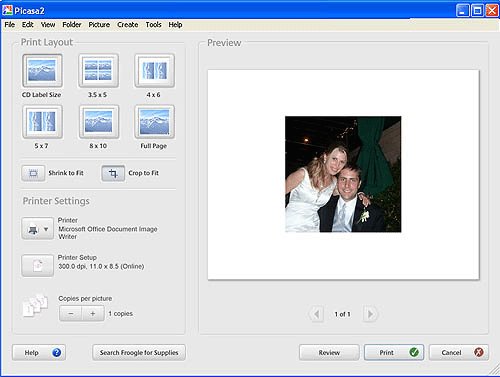
In the top menu, go to to Tools > Options > Printing, select CD Label Size and click OK. Set CD Label as your layout size and print.
You're done -- and now I'm done with my thank-you "work." I'm happy to report the photo CDs were a big hit.
I recently got married and wanted to send out thank-you notes together with hundreds of photos our guests took using the cameras we put on the tables. Picasa made the process super easy.
In Picasa, select the folder with your pictures. Click the "Gift CD" button and follow the instructions to set your picture size and CD name. To add a nice effect, check the "Include Slideshow" box -- this adds a slideshow presentation that plays when the CD is launched (way more fun than a boring list of files). For recipients who might enjoy saving the photos and viewing them later, check the box to include a copy of Picasa on the CD (it's only 3.9MB). Click "Burn Disc" and Picasa creates the CD.
The finishing touch: a customized photo CD cover. Select a picture and click the "Print" button. Here's what it looks like:
In the top menu, go to to Tools > Options > Printing, select CD Label Size and click OK. Set CD Label as your layout size and print.
You're done -- and now I'm done with my thank-you "work." I'm happy to report the photo CDs were a big hit.